⭐gradle Jib plugin이란?
스프링부트 어플리케이션을 배포 시,Jib을 사용하면, Docker Daemon없이(->docker desktop을 안켜도 됨) 도커 이미지를 build하고, docker hub에 push까지 해준다!! 정말 편한 플러그인이다!!
<상황>
gradle plugin인 Jib을 이용해서 Docker 이미지 build를 하려고 했다
./gradlew jib를 하니 역시 한 번에 될리가 없지.. 에러가 떳다..
The credential helper (docker-credential-desktop) has nothing for server URL: registry-1.docker.io

Got output:

credentials not found in native keychain

The credential helper (docker-credential-desktop) has nothing for server URL: registry.hub.docker.com

Got output:

credentials not found in native keychain

Using credentials from Docker config (C:\Users\me\.docker\config.json) for adoptopenjdk/openjdk11:alpine-jre
Executing tasks:
[==========                    ] 33.3% complete
> pushing blob sha256:06ee5dbd7a12b102c72b3d6c5...


> Task :jib FAILED

FAILURE: Build failed with an exception.

* What went wrong:
Execution failed for task ':jib'.
> com.google.cloud.tools.jib.plugins.common.BuildStepsExecutionException: Build image failed, perhaps you should make sure your credentials for 'registry-1.docker.io/adoptopenjdk/openjdk11' are set up correctly. See https://github.com/GoogleContainerTools/jib/blob/master/docs/faq.md#what-should-i-do-when-the-registry-responds-with-unauthorized for help

* Try:
> Run with --stacktrace option to get the stack trace.
> Run with --info or --debug option to get more log output.
> Run with --scan to get full insights.

* Get more help at https://help.gradle.org
내용을 읽어보니 , credential(증명)과 관련된 에러이고
openjdk이미지의 경로인 registry-1.docker.io에 대한 credential이 없어서 생긴 에러이다.
해결방법으로 C:\Users\me\.docker\config.json 경로의 credential 설정 파일을 열어 설정을 해주어야한다.
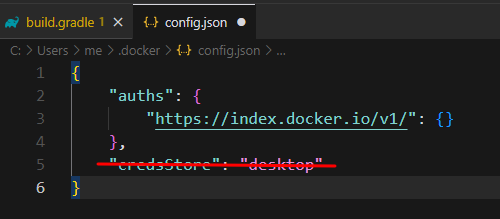
여기 파일의 "creadStore":"desktop"부분을 지우면 정상적으로 jib으로 빌드를 할 수 있다!!
"creadStore"는 사용자 인증 정보 저장소라고하는데
Jib은 docker desktop을 사용하지 않으니, openjdk image를 pull할때 credential문제가 발생한 것 같다.
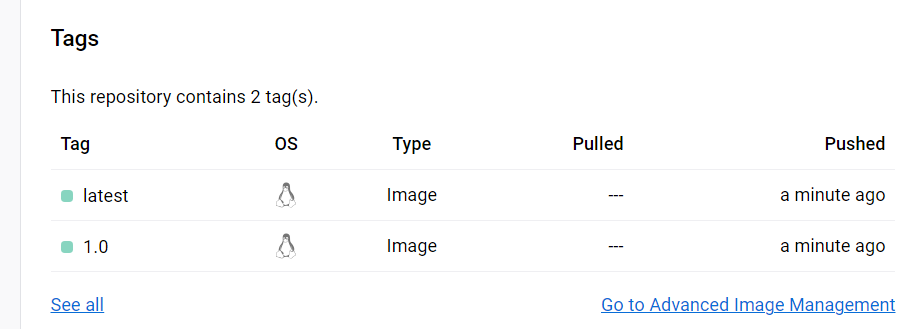
도커 허브에서도, 내가 만든 스프링부트앱이 도커이미지로 push된 것을 확인할 수 있었다.
참고 : https://stackoverflow.com/questions/72277087/401-unauthorized-when-using-jib-to-create-docker-image
댓글